
If you happen to have an existing vRSLCM 2.x and vIDM 3.3.0 in your environment then you will need the vRealize Easy Installer to migrate your existing vRSLCM 2.x instance to vRSLCM 8.0.
Once your migration to vRSLCM 8.0 is completed you can upgrade your vIDM instance to 3.3.1 since its a requirement before you can install vRealize Automation 8.0 with vRealize Lifecycle Manager 8.0
Again as a reminder vRealize Automation 8.0 is installed, configured, managed and upgraded only through vRealize Suite Lifecycle Manager 8.0
Now as for requirements you will need :
- A new Hostname, IP Address and a DNS record for the new vRSLCM 8.0 appliance that the vRealize Easy Installer will be creating.
- To make sure that the password for the sshuser on the existing vIDM appliance is not expired.
- To enable root access for SSH on the existing vIDM appliance following VMware KB 2047626
- To Download the install and upgrade binaries for vRealize Suite 2019
- To Make sure you have enough storage on the new vRSLCM 8.0 appliance.
Migration Workflow
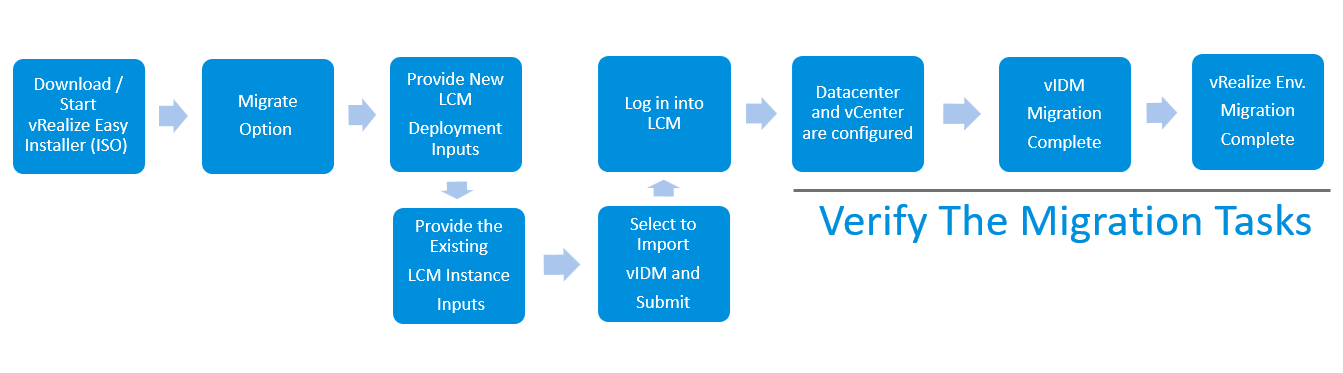
Please note that the installation process in the video after hitting submit is fast forwarded.
NOTE (vIDM Upgrade Support ) :
- Green-field vRealize Suite Lifecycle Manager 8.0 supports only 3.3.1 version of VMware Identity Manager to be installed or imported.
- Older versions (2.9.2, 3.2.0, 3.2.0.1 & 3.3.0) of VMware Identity Manager will be supported only for existing vRealize Suite Lifecycle Manager instances that are being migrated to vRealize Suite Lifecycle Manager 8.0.
- Upgrade support from older VMware Identity Manger to latest is only available if they conform to vRealize Suite Lifecycle Manager supported form-factor.
- Versions prior to vRealize Suite Lifecycle Manager 8.0 allowed only single instance of VMware Identity Manager to be deployed with embedded connector and embedded postgresql database.
- Upgrade for VMware Identity Manager within vRealize Suite Lifecycle Manager 8.0 to latest versions will only be supported if it conforms to the above mentioned form-factor.
Else the upgrade has to be performed outside vRealize Suite Lifecycle Manager and Once upgraded, it can any-time be re-imported by triggering Inventory Sync in vRealize Suite Lifecycle Manager 8.0
The End, Eh!
Helpful Links You Might Need
Resetting the admin@localhost password in vRealize Suite Lifecycle Manager




 VMware Lab
Leave a reply to Ralph Cancel reply